
Controlling where customization is stored
The CSON configuration files for Pulsar are stored on disk on your machine. The location for this storage is customizable. By default, it will be called .pulsar and will be located in the root of the home directory of the user.
Custom home location with an environment variable
An environment variable can be used to make Pulsar use a different location. This can be useful for several reasons — for instance, if multiple user accounts on a machine want to use the same Pulsar home folder.
The environment variable used to specify an alternate location is called ATOM_HOME. If this environment variable exists, the location specified will be used to load and store Pulsar settings.
Taking your customization with you with portable mode
In addition to using the ATOM_HOME environment variable, Pulsar can also be set to use “portable mode.”
Portable mode is most useful for taking Pulsar with you, with all your custom settings and packages, from machine to machine. This may take the form of keeping Pulsar on a USB drive or a cloud storage platform that syncs folders to different machines, like Dropbox. Pulsar is in portable mode when there is a directory named .pulsar sibling to the directory in which the pulsar executable file lives. For example, the installed Pulsar directory can be placed into a Dropbox folder next to a .pulsar folder.
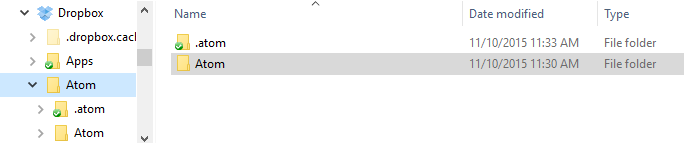
With such a setup, Pulsar will use the same home directory with the same settings for any machine with this directory synchronized/plugged in.
Moving to portable mode
Pulsar provides a command-line parameter option for setting portable mode.
$ pulsar --portableExecuting pulsar with the --portable option will take the .pulsar directory you have in the default location (~/.pulsar%USERPROFILE%\.pulsar) and copy the relevant contents for your configuration to a new home directory in the portable mode location. This enables easily moving from the default location to a portable operation without losing the customization you have already set up.