
Choosing a grammar
Simply put, the “grammar” of a file is the language that Pulsar has associated with that file. Examples of grammars include “Java,” “Python,” and “GitHub-Flavored Markdown.”
Or, more accurately: Pulsar uses the word grammar to refer to a bundle of logic that is used to
- syntax-highlight a particular language,
- identify where code folding can occur, and
- infer which actions should automatically indent and dedent the cursor
among several other tasks.
When you load a file, Pulsar tries to figure out the best grammar to use for that file. It uses a number of techniques to pick a grammar, though usually the first technique is sufficient:
- Inspecting the file extension. (
.mdusually means a Markdown file, for example.) - Inspecting the first line of the file. (Shell scripts and other files without extensions can sometimes indicate their language via metadata on the first line.)
- Inspecting the contents of the file. (When two different languages use the same file extension — like C and C++, in some unusual cases — the file contents themselves can give us hints about which language is being used.)
- More than one type of grammar is often present for a given language (for reasons we’ll discuss later), so Pulsar will look at the user’s configuration to decide which type of grammar they prefer on a language-by-language basis.
When Pulsar can’t even make a guess at the right grammar, it will default to “Plain Text,” which is the simplest one. If it does default to “Plain Text” or picks the wrong grammar for the file — or if, for any reason, you wish to change the selected grammar — you can pull up the grammar selector with Ctrl+Shift+L, which invokes the Grammar Selector: Show command.
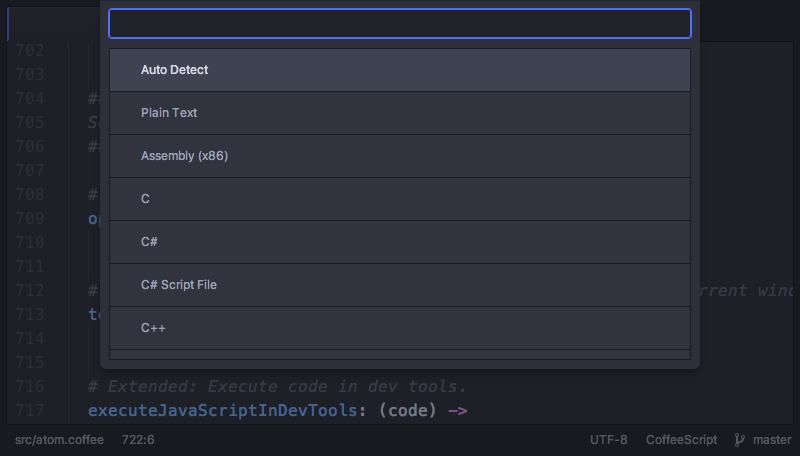
When the grammar of a file is changed, Pulsar will remember that change for the current session.
Grammars are part of the core Pulsar editor, as is the logic for automatic detection of which grammar to use for a given file. Like most of the other features we’ve covered in this section, grammars are provided by packages, whether builtin or third-party. Several dozen grammar packages are built into Pulsar, but many more can be installed.
The grammar selector functionality is implemented in the grammar-selector package.