
Folding
If you want to see an overview of the structure of the code file you’re working on, folding can be a helpful tool. Folding hides blocks of code such as functions or looping blocks in order to simplify what is on your screen.
You can fold blocks of code by clicking the arrows that appear when you hover your mouse cursor over the gutter. You can also fold and unfold from the keyboard with the Alt+Ctrl+[Alt+Cmd+[ and Alt+Ctrl+]Alt+Cmd+] keybindings. These correspond to the Editor: Fold/Unfold Current Row commands.
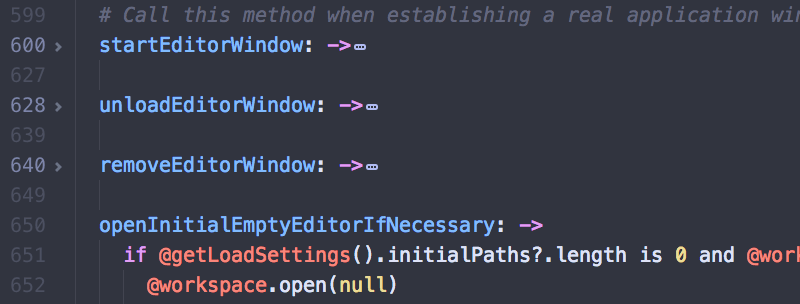
To fold everything, use Alt+Ctrl+Shift+[Alt+Cmd+Shift+[ and to unfold everything use Alt+Ctrl+Shift+]Alt+Cmd+Shift+]. You can also fold at a specific indentation level with Ctrl+K Ctrl+1-9 Cmd+K Cmd+1-9 where the number is the indentation depth. These correspond to the Editor: Fold/Unfold All and Editor: Fold at Indent Level X commands (where X is a number from 1 to 9).
Finally, you can fold arbitrary sections of your code or text by making a selection and then typing Alt+Ctrl+F Alt+Cmd+Ctrl+F or choosing Editor: Fold Selection in the Command Palette.
Folding is a core feature.